
This is the print version of this page. All content is copyright Indezine.com 2000-2026.
Thoughts and impressions of happenings in the world of PowerPoint and presentations, continuously updated since 2003.
See Also:
PowerPoint and Presenting Notes
PowerPoint and Presenting Glossary
When your 3D chart comprises columns of various heights, chances are that some of the columns hide other columns placed behind them. This is especially true with 3D charts that have a Z axis. One of the ways to make the columns placed behind visible is to make the taller columns transparent. The other way to solve this issue is to rotate the 3D chart so that you end up with a view in which the shorter columns become clearly visible.
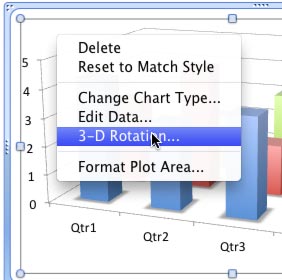
Learn how to rotate 3D charts in PowerPoint 2011 for Mac
Filed Under:
PowerPoint 2011
Tagged as: Charting, Office for Mac, PowerPoint 2011, Tutorials
Comments Off on Learn PowerPoint 2011 for Mac: Rotate 3D Charts
PowerPoint 2013 allows you to customize the Ribbon in a number of ways — you can add Ribbon tabs, add Groups, and populate these with commands. And if you think you made a mess and were better off with the defaults, then you can always get back to square one. On another front, you can share your customizations with friends and colleagues — or also your other computers. And you can export your customizations to a file saved as a backup for a rainy day!

Learn how to reset, export, and import Ribbon customization in PowerPoint 2013 for Windows.
Filed Under:
PowerPoint 2013
Tagged as: PowerPoint 2013, Tutorials
Comments Off on Reset, Export, and Import Ribbon Customizations in PowerPoint 2013 for Windows
You may have heard that 30 million PowerPoint presentations are created daily. Everyone quotes that figure! And the amazing part is not that 30 million is a big number. What I find more interesting than just the number, is the fact that this big figure was first mentioned almost twenty years ago.

Frankly, this 30 million figure brings forth more questions than answers:
No one knows the answers to all these questions, and I certainly do not. However, this 30 million figure needs to have a source. Funnily enough, one site even credits me as a possible source for this figure! Even though I cannot take this credit, I do realize that it does not matter what the exact figure may be. We all agree that an astronomical number of PowerPoint presentations are created and delivered each day—and most of these presentations have slides that are not too awesome, and that’s something we can discuss some other time. Let us now get back to the 30 million figures.
Just for the sake of scale, let us believe that the older 30 million figure holds true for today! That would indicate that around 350 presentations are born each second! So maybe thousands of presentations are being created at the speed at which you read every single word within this article.
Let us next explore retrospectively and create a trail back to how this all started, and who better than Robert Gaskins, the founder of PowerPoint to answer this question. On his site, I found this quote (on the home page):
After I left, others from the original team continued working and ten years later, by 2003, PowerPoint revenues for Microsoft exceeded $1 billion annually. By then PowerPoint was being used by over 500 million people worldwide, with over 30 million PowerPoint presentations being made every day.

He did mention the year, 2003–and a quick Google search bought up this PDF of a paper from Microsoft Research. The paper is dated October 2003, and this was probably the first time that someone from Microsoft quoted the 30 million figures.

However this paper does credit their source to an article by Ian Parker called Absolute PowerPoint: Can a software package edit our thoughts? This article was published by The New Yorker in their May 28, 2001 issue (pages 76–87), and is still available in the archives at the New Yorker site.
In this article, Ian Parker says: According to Microsoft estimates, at least thirty million PowerPoint presentations are made every day

So, who is Ian Parker? He became a staff writer for New Yorker in 2000 and has authored some amazing articles for the publication, but I doubt if anything he has written has achieved the fame and status that his PowerPoint article did! I looked at his other articles, and those are more about literature, the arts, and even current affairs, but not so much about technology.
So there’s only so much to assume: Parker is the origin of this 30 million figure that has been quoted for two decades. Nothing or no one has substantiated this claim of 30 million, and nor did New Yorker attribute a source for this claim. Although Microsoft somehow may have confirmed this figure by quoting 30 million PowerPoint presentations a few times, it never bothered releasing an updated number in the last many years? This may have changed though with Satya Nadella’s keynote for Microsoft’s Build 2015 event. See our 30 Million or a Billion PowerPoint Slides? post to know more.
Hopefully, we all will learn more about creating better PowerPoint slides rather than just these 30 million PowerPoints! Until then, have a great day, and stay safe. Also, keep creating and showing cool slides!
Filed Under:
Thoughts
Tagged as: Death by PowerPoint, Opinion, PowerPoint, Robert Gaskins
SlideBoom is a web site where you can upload and share your PowerPoint presentations — at the back-end, a PowerPoint to HTML5 or Flash converting engine makes online movies of all your PowerPoint slides. Each uploaded presentation on SlideBoom is provided a unique page URL that you can share with friends and others who want to see your presentation.

Learn about SlideBoom — a web site where you can upload and share your PowerPoint presentations.
Filed Under:
PowerPoint All Versions
Tagged as: Online Presentations, PowerPoint, SlideBoom
Comments Off on About SlideBoom
These Four Petals Circle graphics are part of our Petal Circles series that add stylized tips to your circle shapes. These two tip styles: Rounded and Pointed make your circles look different from conventional segmented circle graphics. They also break the monotony of text heavy slides, and help you explain concepts better to your audiences. Using these circle shapes also convinces your audiences that you care enough about them to make the slides look appealing and comprehensible. What’s more, these shapes are also so much fun to use!
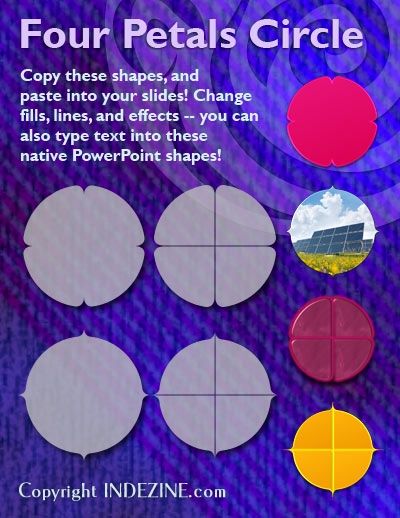
Buy and download these slides now.
Filed Under:
Presentation Bank
Tagged as: Design, Graphics, PowerPoint, Presentation Samples
Comments Off on PowerPoint Concept Slides: Four Petals Circle
Microsoft and the Office logo are trademarks or registered trademarks of Microsoft Corporation in the United States and/or other countries.