
This is the print version of this page. All content is copyright Indezine.com 2000-2026.
Thoughts and impressions of happenings in the world of PowerPoint and presentations, continuously updated since 2003.
See Also:
PowerPoint and Presenting Notes
PowerPoint and Presenting Glossary
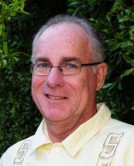
Tom Bunzel specializes in knowing what other presenters need and how to make technology work. He has appeared on Tech TV’s Call for Help as “Professor PowerPoint”, and is a featured speaker at industry events each year. Tom is also a “technology coach” and does presentation and video consulting in southern California. Tom’s new eBook, Presence of Mind: Journey to a New Operating System is now available online. You can also visit his site, The Presentation Professor and his BunzBlog blog.
In this conversation, Tom discusses how you should create a new presentation from scratch, and also his new book.
Geetesh: How do you approach creating a new presentation? Can you share some thoughts?
Tom: Sure. I think the best way to approach a presentation is like I imagine writing a mystery novel would be—from the ending first. In a mystery you devise a plot with a powerful ending that amazes the reader; in a presentation, you figure out what the final outcome will be: for sales a call to action; for training, the ability to manage a task; for an inspirational talk, a deep message of change.
When you know the ending you can begin to strategize how to get there. You want to reach different kinds of audiences—rational thinkers may respond to facts while many people believe that they’re rational but they may respond to emotions like fear (not my favorite) or adventure and opportunity to thrive, or to overcome an obstacle.
So then you want to build your story toward your inevitable conclusion using the various building blocks you’ve got—and then you would inventory your creative media assets in this regard—including text (strong simple statements), pictures (metaphors and allegories), video (supporting narrative) and perhaps even music (emotional tone).
Finally, you would want your presentation to be in a context—as part of a larger matrix of communication—in today’s environment. In my book Tools of Engagement: Presenting and Training in a World of Social Media, I maintain that presentations today must be conversations because today’s audiences expect context. They want access to the presenter before and after an event, in terms of researching their qualifications and also getting to know them personally. That’s why so many of today’s presentations are part of an overall social strategy that includes programs like Facebook, Twitter, and LinkedIn online, along with webinars and blogs, all around the staple of a PowerPoint or Keynote presentation. A presentation used to be a single event and a broadcast by someone in authority on a podium or with a projector; now if it’s not part of a larger conversation it is often ignored amid the immense amount of compelling information out there.
Geetesh: You often mention TED Talks – can you share a few of your favorites, and what you liked best about them?
Tom: My life actually changed in 2007 when I viewed a video by geneticist Juan Enriquez on TED.com in which he describes how altering the genome results in a different species, and how an “apple is an application; when the sun hits it the program executes, and the apple falls from the tree.”
At the time I was thinking of writing a science fiction story in which a computer program was discovered in the brain which made people realize that we were the product of a higher intelligence—that we didn’t need to search for “intelligent life” in the universe—it was inside of us.
Well, Enriquez’s video made me realize this wasn’t science fiction—it’s the truth. With DNA, we now know that the instructions that control our breathing, digestion, circulation, and all life are essentially organic programs (genetics and epigenetics) that operate literally as computer programs (not merely functions that are allegorically similar or work analogously to computer programs). All of life is processing information every microsecond.
What does this suggest? Well, for one thing, we can literally “cut and paste” Life – it’s been done as we move the code from one organism to another and change its “properties” and “methods” – terms that computer programmers will understand.
But we must also deeply consider the obvious fact that computer programs (like Word and PowerPoint) did not “evolve” – they were designed by teams of programmers with conscious and intelligent intentions to perform tasks and serve a purpose.
Of course, in our modern world, this brings up the issue of fundamentalism and Intelligent Design; but I think that is a false dichotomy—the conflict with modern science.
Modern science is coming up against the reality of consciousness and the intelligence of nature all the time—in quantum mechanics and also in astrophysics and mathematics. (Our supercomputers which sequenced the genome have “found” (calculated) the largest prime number—but obviously in nature there “is” a larger number beyond that)….
I believe that computer programs are pointing all of us to a higher truth—that the universe we inhabit is much greater in scale than what we currently understand, and even science (if we don’t blow ourselves up) is on the verge of discovering a higher level of intelligence in nature.
“God” is just a word or placeholder—I think of it as the ultimate variable in computer programming. But we are on the verge of either transcending our current view of our own nature (and the universe) or going extinct as a species.
Sorry to go on the soapbox. But we act like we completely understand and control nature, and if you look around, you can see the results.
A more recent video on TED was a talk about How algorithms shape the world, by Ken Slavin, who describes how computers operating at speeds unfathomable to humans are manipulating our economic system in ways we don’t even comprehend. Well, again, algorithms are apparent in nature – the Fibonacci sequence (or Golden Mean) for example is mathematical perfection manifest almost everywhere you look. It’s hard to recognize this, and not realize with a certain reverence that much greater intelligence has been present much longer than we have—we’ve had the personal computer for almost 50 years; DNA has been running for billions of years.
These are some of the questions I am currently dealing with, and they’re not always comfortable, but I think we delude ourselves if we avoid confronting them. So, at the moment I am trying to cross the barriers between computer technology, psychology, and religion.
See Also: Tools of Engagement: Conversation with Tom Bunzel
The views and opinions expressed in this blog are those of the authors and do not necessarily reflect the official policy or position of any other agency, organization, employer, or company.
Filed Under:
Interviews
Tagged as: Books, Interviews, Opinion, PowerPoint, Tom Bunzel
Comments Off on PowerPoint and Philosophy: Conversation with Tom Bunzel
Silhouettes are amazing, and yet so practical to use. They don’t tell too much and yet that is sometimes just what you need. Here are some businesspeople silhouettes ready to use within your PowerPoint presentation slides. In the sample PowerPoint presentation that you will download, you will find these silhouettes in both black and white colors, contained within two separate slides. You will also find one more slide that contains some variations of these businesspeople silhouettes applied with some fills, lines, and effects, which will help you to start with. You can edit them further using PowerPoint’s fills, lines, and effects to make them appear coordinated with your slides.

Copy the silhouettes graphics (clip arts) of your choice from the downloaded presentation, and paste them into your PowerPoint presentation slides. All these silhouette graphics can be used and customized with Shape Styles just like any other PowerPoint shape. You can also paste them into a Word document, an Excel worksheet, or any other program.
Download and use these silhouettes in your presentations.
Filed Under:
Presentation Bank
Tagged as: Graphics, PowerPoint, Presentation Samples
Comments Off on Businesspeople Silhouettes for PowerPoint – 01
When you insert a video clip within a PowerPoint slide, you’ll find it placed as a traditional rectangular shape. And while that’s exactly what most users expect, it does seem safe and conventional. However, PowerPoint 2010 does allow you to have your video playing in different shapes such as a circle or oval, or a wave, a triangle, or any of the shapes that PowerPoint includes. Just the fact that a video can be placed within a shape is no reason to forego the conventional rectangle — do remember that most other shapes may crop out important parts of your video clips.

Learn how add shapes for videos in PowerPoint 2010 for Windows.
Filed Under:
PowerPoint 2010
Tagged as: PowerPoint 2010, Tutorials, Video
Comments Off on Learn PowerPoint 2010 for Windows: Video Shape
YouTube Video Wizard is a PowerPoint add-in that enables you to insert YouTube videos into a PowerPoint slide using just the YouTube video URL that appears in the browser address bar. This is much easier than following the official Microsoft process of inserting online videos — and Microsoft’s suggested option only works in PowerPoint 2010 or later. YouTube Video Wizard, on the other hand, works in almost all Windows versions of PowerPoint. YouTube Video Wizard is from Shyam Pillai, a Microsoft PowerPoint MVP who creates several PowerPoint add-ins.

Filed Under:
Reviews
Tagged as: Add-in, PowerPoint, Review, Shyam Pillai, YouTube
Comments Off on YouTube Video Wizard: The Indezine Review
When you want to change the default look of your slide background, you can explore the various slide background styles available in PowerPoint. Other than these styles, you can certainly explore specific options that we have already covered: solid, gradient, or picture fills for slide backgrounds. In addition, you can also choose a texture fill for your slide background. Texture and picture fills for slide backgrounds have so much in common; the same picture can be used for both a texture or a picture fill — the main difference is that while a picture background results in your slide using a single picture as a backdrop, using a texture background can result in the same picture being tiled across the slide background — imagine a wallpaper on your room’s wall with repeating motifs. Also some pictures lend themselves better to being used as textures, especially if they are seamless.
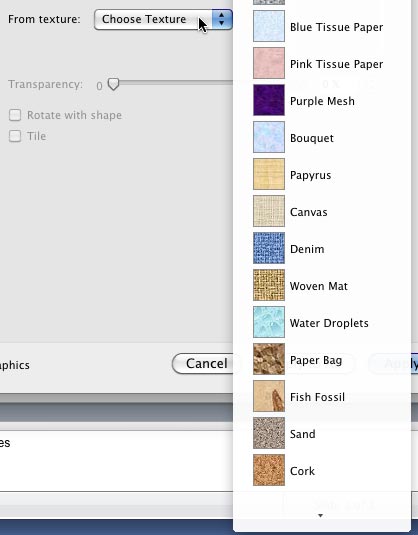
Learn how to apply texture fills as a slide background in PowerPoint 2011 for Mac.
Filed Under:
PowerPoint 2011
Tagged as: Background, Office for Mac, PowerPoint 2011, Tutorials
Comments Off on Learn PowerPoint 2011 for Mac: Texture Fills for Slide Backgrounds
Microsoft and the Office logo are trademarks or registered trademarks of Microsoft Corporation in the United States and/or other countries.