
This is the print version of this page. All content is copyright Indezine.com 2000-2026.
Thoughts and impressions of happenings in the world of PowerPoint and presentations, continuously updated since 2003.
See Also:
PowerPoint and Presenting Notes
PowerPoint and Presenting Glossary
While PowerPoint does not have a Timelines category within the SmartArt graphics available, you can still find some Timeline variants hidden within the Process category. Follow these steps to insert and edit Timelines from the SmartArt gallery in PowerPoint 365 for Windows.

Learn how you can create timelines with SmartArt in PowerPoint 365 for Windows.
Filed Under:
PowerPoint 365
Tagged as: Microsoft Windows, Office 365, PowerPoint 365, SmartArt, Timeline, Tutorials
Comments Off on Creating Timelines Using SmartArt in PowerPoint 365 for Windows
Most of the time, you may work on a single slide in your PowerPoint presentation, but there are times when you want to copy, duplicate, reorder, or even delete a bunch of slides. It’s in scenarios like these that you will encounter PowerPoint 365’s Slide Sorter view. Among the various views available in PowerPoint 365 for Windows to play and edit your presentations, we have already covered both Normal view and Outline view. Although Slide Sorter view does not let you edit individual slide objects, it does let you work with whole slides. Any edits made will influence one or more slides, depending on your selection.
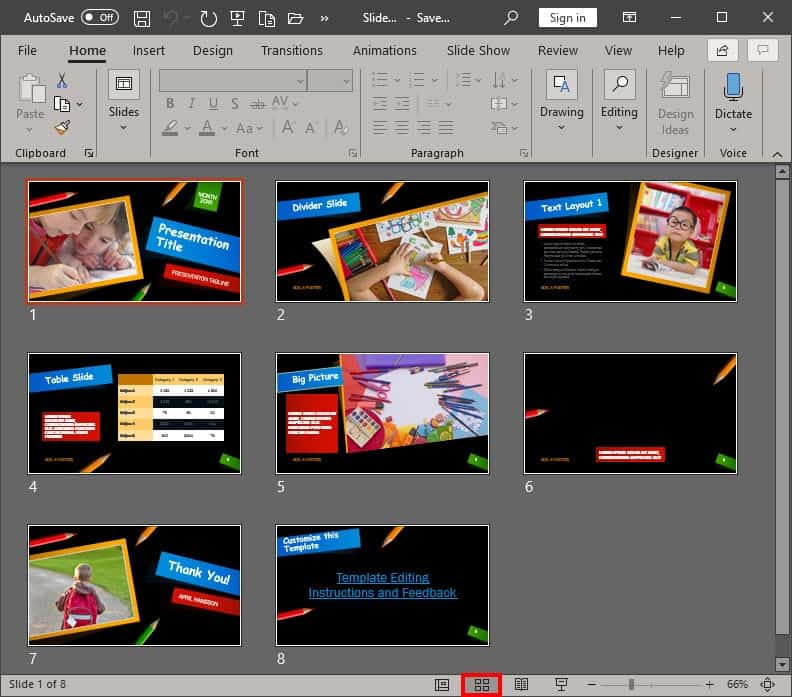
Learn about the Slide Sorter view in PowerPoint 365 for Windows.
Filed Under:
PowerPoint 365
Tagged as: Microsoft Windows, Office 365, PowerPoint 365, Slide Sorter View, Tutorials, View
Comments Off on Slide Sorter View in PowerPoint 365 for Windows
We first explore nine of the best props to add impact to your presentation, by Vinette Hoffman-Jackson. We also look at editing picture slides created with PowerPoint Designer in PowerPoint 365 for Windows.
PowerPoint 365 for Mac users can explore the different PowerPoint views, and we also specifically explore the editing view, typically called Normal View for users of PowerPoint 2019 and 365 for Windows, and also 365 for Mac. Also, make sure you do not miss the quotes, press releases, and templates featured in the last week.

Stay informed about updated tutorials and happenings related to PowerPoint and presenting.
Filed Under:
Ezine
Tagged as: Ezine, Indezine, News, PowerPoint
Comments Off on PowerPoint and Presenting News: December 24, 2019
Unlike in Windows versions of PowerPoint, where you can quickly press the Alt key to access the menu or even the Ribbon tabs, the Mac versions of PowerPoint provide no equivalent feature. However there is an alternative, and you can learn how to invoke keyboard sequences by accessing your menu bar in PowerPoint 365 for Mac.

Explore Keyboard Sequences in PowerPoint 365 for Mac.
Filed Under:
PowerPoint 365
Tagged as: Keyboard Sequences, Mac, Office 365, Office for Mac, PowerPoint 365, PowerPoint for Mac, Tutorials
Comments Off on Keyboard Sequences for PowerPoint 365 for Mac
Most of the time, you may work on a single slide in your PowerPoint presentation, but there are times when you want to copy, duplicate, reorder, or even delete a bunch of slides. It’s in scenarios like these that you will encounter PowerPoint 2019’s Slide Sorter view. Among the various views available in PowerPoint 2019 for Windows to play and edit your presentations, we have already covered both Normal view and Outline view. Although Slide Sorter view does not let you edit individual slide objects, it does let you work with whole slides. Any edits made will influence one or more slides, depending on your selection.

Learn about the Slide Sorter view in PowerPoint 2019 for Windows.
Filed Under:
PowerPoint 2019
Tagged as: Microsoft Windows, Office 2019, PowerPoint 2019, Slide Sorter View, Tutorials, View
Comments Off on Slide Sorter View in PowerPoint 2019 for Windows
Microsoft and the Office logo are trademarks or registered trademarks of Microsoft Corporation in the United States and/or other countries.