
This is the print version of this page. All content is copyright Indezine.com 2000-2026.
Thoughts and impressions of happenings in the world of PowerPoint and presentations, continuously updated since 2003.
See Also:
PowerPoint and Presenting Notes
PowerPoint and Presenting Glossary
PowerPoint 365 for Windows provides several views that enable you to view and edit your slides. Unarguably, Normal view is the default and most often used view. This view displays one slide at a time in the Slide Area, and is used mainly for editing and creating slides, and shows PowerPoint’s typical tri-pane interface that includes the Slides Pane, the Slide Area, and the Notes Pane. If you cannot see the Slides Pane in Normal view, scroll down this page to read a tip that will help you restore that pane.

Learn about the Editing view (Normal View) in PowerPoint 365 for Windows.
Filed Under:
PowerPoint 365
Tagged as: Microsoft Windows, Normal View, Office 365, PowerPoint 365, Tutorials, View
Comments Off on Normal View (Editing View) in PowerPoint 365 for Windows
PowerPoint 365 for Mac provides several views that enable you to view and edit your slides. Unarguably, Normal view is the default and most often used view. This view displays one slide at a time in the Slide Area, and is used mainly for editing and creating slides, and shows PowerPoint’s typical tri-pane interface that includes the Slides Pane, the Slide Area, and the Notes Pane. If you cannot see the Slides Pane in Normal view, scroll down this page to read a tip that will help you restore that pane.

Learn about the Editing view (Normal View) in PowerPoint 365 for Mac.
Filed Under:
PowerPoint 365
Tagged as: Mac, Normal View, Office 365, Office for Mac, PowerPoint 365, PowerPoint for Mac, Tutorials, View
Comments Off on Normal View (Editing View) in PowerPoint 365 for Mac
Let’s assume that you already used some picture slide layouts from PowerPoint Designer, as explained in our Working With Pictures in PowerPoint Designer in PowerPoint 365 for Windows tutorial. And now, you want to change the picture used, or even add another picture. You’ll discover that changing pictures is not too easy, because PowerPoint does not respect the proportions of the picture you are replacing, and almost places a new picture without any concerns about visual aesthetics. So, how can you add another picture in the same position, and ensure that the size and the proportions of the picture also remain the same?

Learn how to edit picture slides created using PowerPoint Designer in PowerPoint 365 for Windows.
Filed Under:
PowerPoint 365
Tagged as: Design Ideas, Microsoft Windows, Office 365, PowerPoint 365, PowerPoint Designer, Tutorials
Comments Off on Editing Picture Slides Created With PowerPoint Designer in PowerPoint 365 for Windows
There are many commands in PowerPoint 365 for Windows that have no keyboard shortcuts allotted to them. In situations such as these, you can explore keyboard sequences. We list some important ones. We also feature Kurt Dupont, who discusses his SignageTube digital signage product in both a textual and a video interview. Paul Carroll of Toastmasters explains how you can give a short speech at a celebratory festive event, or almost anywhere else.
PowerPoint 365 for Windows users can learn about working with pictures in PowerPoint Designer, and you can also explore disabling the automatic launch of the Design Ideas task pane. We also look at the different PowerPoint views and the Status Bar in PowerPoint 365 for Windows. Also, make sure you do not miss the quotes, press releases, and templates featured in the last week.

Stay informed about updated tutorials and happenings related to PowerPoint and presenting.
Filed Under:
Ezine
Tagged as: Ezine, Indezine, News, PowerPoint
Comments Off on PowerPoint and Presenting News: December 17, 2019
View your same slides in different PowerPoint views, and you will see them from another angle. This approach makes sense because viewing slides in Slide Show view gives an entirely different perspective than editing them in Normal view. Further, it’s easier to reorder and work with multiple slides in Slide Sorter view, and make changes to individual slides in Normal view.
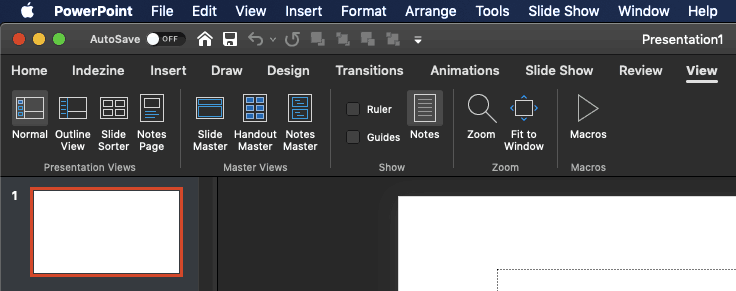
Learn about various views that allow you to edit and show slides in PowerPoint 365 for Mac.
Filed Under:
PowerPoint 365
Tagged as: Mac, Office 365, Office for Mac, PowerPoint 365, PowerPoint for Mac, Tutorials, View
Comments Off on Views in PowerPoint 365 for Mac
Microsoft and the Office logo are trademarks or registered trademarks of Microsoft Corporation in the United States and/or other countries.