
This is the print version of this page. All content is copyright Indezine.com 2000-2026.
Thoughts and impressions of happenings in the world of PowerPoint and presentations, continuously updated since 2003.
See Also:
PowerPoint and Presenting Notes
PowerPoint and Presenting Glossary
In various versions of PowerPoint, including PowerPoint 365 for Mac, what’s the one thing that has not changed? Yes, it’s PowerPoint’s tri-paned interface! So, why is the interface called tri-paned? Are there three distinct regions within the PowerPoint 365 for Mac interface? Yes, the Slide Area is one of three principal regions in PowerPoint 365; the other two being the Slides Pane and the Notes Pane. The Slide area is where you work the most, typically through adding and editing slide objects.

Explore the Slide Area, and tricks to make slide editing more productive in PowerPoint 365 for Mac.
Filed Under:
PowerPoint 365
Tagged as: Interface, Mac, Office 365, Office for Mac, PowerPoint 365, PowerPoint for Mac, Slide Area, Tutorials
Comments Off on Slide Area in PowerPoint 365 for Mac

Lori Chollar is co-founder and CEO of TLC Creative Services, based in Southern California. Her multi-faceted design background includes traditional graphic and print design, apparel and tattoo design, and of course, an amazing range of presentation, template and multimedia design. Building from a formal degree in graphic design to a thriving freelance business, her company with husband Troy, TLC Creative Services, has grown into a successful corporate design studio. Lori is passionate about good design and good business. Some of her favorite pastimes include walking their dog Scout, critiquing billboards and collecting toys to clutter…uhm…decorate her desk.
In this conversation, Lori talks about the Presentation Summit, being held in San Antonio, TX this year from October 6 to 9, 2019.
Filed Under:
Events
Tagged as: Events, Interviews, Lori Chollar, Presentation Summit, Rick Altman, San Antonio, Troy Chollar
Comments Off on Presentation Summit 2019: Conversation with Lori Chollar
Many new changes have shown up in PowerPoint 2019 for Windows and several other versions released in the past. However, one thing that has not changed is PowerPoint’s tri-paned interface! So why is the interface called tri-paned? Are there three distinct regions within the PowerPoint 2019 interface? Yes, the Slide Area is one of three principal regions in PowerPoint 2019; the other two being the Slides Pane and the Notes Pane. The Slide area is where you work the most, typically through adding and editing slide objects.

Filed Under:
PowerPoint 2019
Tagged as: Interface, Microsoft Windows, Office 2019, PowerPoint 2019, Slide Area, Tutorials
Comments Off on Slide Area in PowerPoint 2019 for Windows
We first explore another visual cliché: stacks of coins, and how you can find alternatives to this visual topic. Kurt Dupont of PresentationPoint explains how you can create a dynamic countdown in PowerPoint.
PowerPoint for Windows and Mac users can learn how to add an Em Dash. PowerPoint 365 for Windows and Mac users can explore the Notes Pane. And if that wasn’t enough for this week, make sure you do not miss the quotes, press releases, and templates featured in the last week.

Stay informed about updated tutorials and happenings related to PowerPoint and presenting.
Filed Under:
Ezine
Tagged as: Ezine, Indezine, News, PowerPoint
Comments Off on PowerPoint and Presenting News: September 3, 2019
PowerPoint 365 for Windows’s tri-paned interface has three regions: the Slides Pane, the Slide Area, and the Notes Pane. The Notes Pane is placed right below the Slide Area. The Notes Pane provides space to add speaker’s notes that can be so helpful to the presenter while presenting. You can also add any text here that contains any sort of information about the presentation or individual slide.
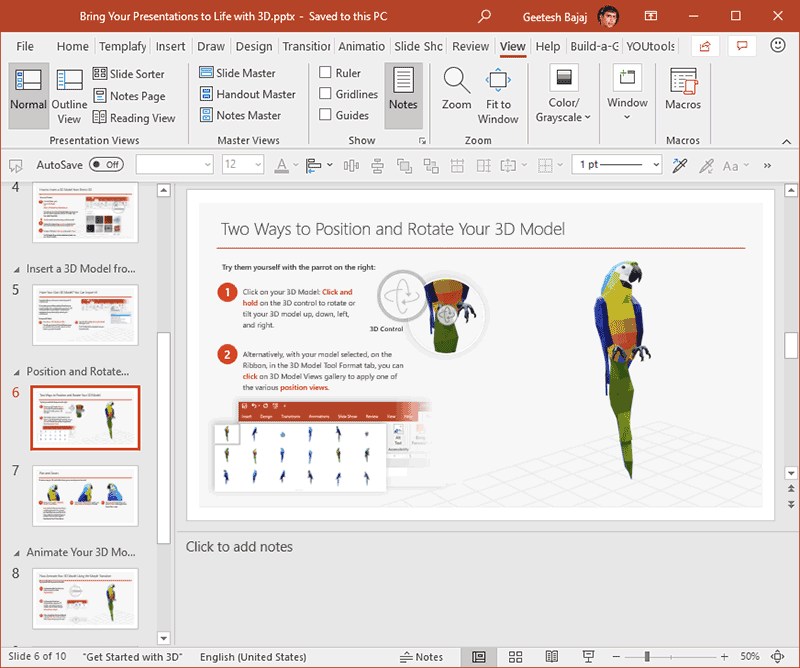
Learn about the Notes pane in PowerPoint 365 for Windows.
Filed Under:
PowerPoint 365
Tagged as: Interface, Microsoft Windows, Notes Pane, Office 365, PowerPoint 365, Tutorials
Comments Off on Notes Pane in PowerPoint 365 for Windows
Microsoft and the Office logo are trademarks or registered trademarks of Microsoft Corporation in the United States and/or other countries.