
This is the print version of this page. All content is copyright Indezine.com 2000-2026.
Thoughts and impressions of happenings in the world of PowerPoint and presentations, continuously updated since 2003.
See Also:
PowerPoint and Presenting Notes
PowerPoint and Presenting Glossary
Do you want to add a degree symbol on your slide? Or do you want to add one of the currency symbols? Or even the trademark or copyright symbols? PowerPoint provides several ways to add such symbols, but the most straightforward option is to use the Symbol dialog box. Let us now explore how you can add symbols within your text containers in PowerPoint 2016 for Windows.
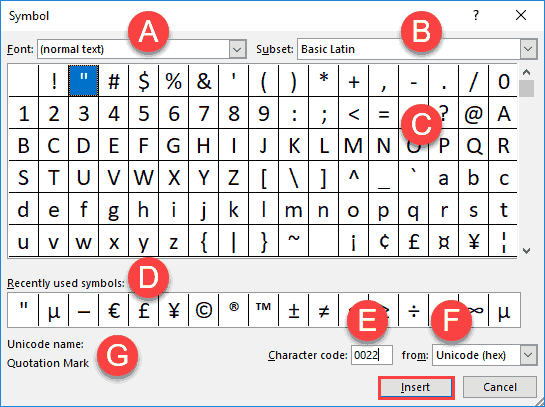
Add symbols within your text in PowerPoint 2016 for Windows.
Filed Under:
PowerPoint 2016
Tagged as: Fonts, Microsoft Windows, Office 2016, PowerPoint 2016, Symbol, Text, Tutorials
Comments Off on Insert Symbol in PowerPoint 2016 for Windows
We begin with a feature by Richard Foster-Fletcher of Toastmasters, who looks explores Key Steps for Feedback When Someone Has Done a Dreadful Job. We also bring you an interview with Jessica Miller of easyPDF, an online tool that lets you convert PDFs into editable PowerPoint slides for no cost. And then we look at some cool guidelines for animation in PowerPoint.
PowerPoint 2016 for Windows users can learn how to Reset, Export, and Import QAT Customizations. PowerPoint 2016 for Mac will explore how to Edit Points for Shapes. And PowerPoint 2013 for Windows users can know more about Text Alignment. And if that wasn’t enough for this week, make sure you do not miss the quotes, press releases, and templates released in the last week.

Stay informed about updated tutorials and happenings related to PowerPoint and presenting.
Filed Under:
Ezine
Tagged as: Ezine, Indezine, News, PowerPoint
Comments Off on PowerPoint and Presenting News: November 13, 2018
PowerPoint and indeed all Microsoft Office programs allow you to work with a particular object only if it is selected. For example, you select a shape to make changes to the shape. You similarly select a chart to edit the chart. And yes, you can select a text container object such as a text placeholder, a text box, or even a shape, and then make changes to its position, formatting, size, etc. However, this changes the entire object and leaves the actual text content within that object largely unchanged. To make changes to the actual text, you first need to select the text separately and then make changes by using the options available within the Home tab of the Ribbon or the Format Task Pane.

Explore various ways of selecting text on a slide in PowerPoint 2016 for Mac.
Filed Under:
PowerPoint 2016
Tagged as: Mac, Office 2016, Office for Mac, PowerPoint 2016, PowerPoint for Mac, Selection, Text, Tutorials
Comments Off on Selecting Text in PowerPoint 2016 for Mac

Paul Balogh is a tech entrepreneur, currently living in London. Paul is busy building a company around one of the most exciting real-time technologies to hit the European school and HE market. For the past decade, he has been working in the book-publishing industry in Eastern Europe. He founded and co-founded startups around digital publishing and also managed large online bookshops and pioneered the creation and distribution of ebooks in the Romanian market.
In today’s conversation, Paul talks about the new Hypersay Pro accounts, and more.
Filed Under:
Interviews
Tagged as: Hypersay, Interactivity, Interviews, Paul Balogh
Comments Off on Hypersay Pro Accounts and More: Conversation with Paul Balogh
By Toastmasters International
Your team members work well most of the time. But what happens when someone goes seriously off track? When dreadful work has been done, you’ll need to have a difficult conversation and give honest feedback.
Counter-intuitively, negative feedback is unlikely to be effective. When the work is good enough, it is easy to sandwich the critique between generous helpings of praise and appreciation. However, a barrage of negative feedback is likely to put the subject into a defensive mindset, where they feel too sorry for themselves to learn.
Image: StockUnlimited
Filed Under:
Guest Posts
Tagged as: Feedback, Guest Post, Opinion, Toastmasters
Comments Off on Key Steps for Feedback When Someone Has Done a Dreadful Job
Microsoft and the Office logo are trademarks or registered trademarks of Microsoft Corporation in the United States and/or other countries.