
This is the print version of this page. All content is copyright Indezine.com 2000-2026.
Thoughts and impressions of happenings in the world of PowerPoint and presentations, continuously updated since 2003.
See Also:
PowerPoint and Presenting Notes
PowerPoint and Presenting Glossary
By Clare Norman, author of Cultivating Coachability
Often, coaching can be less effective than intended. There can be numerous factors at play. For example, it can be because the person receiving coaching doesn’t appreciate or fully buy into the idea that they are the one needing to do the hard work of thinking – they are the thinker in the coaching process. However, many times it’s because coaching relationships are no longer set up for success as well as they used to be. My theory—backed up by twenty plus years of experience as a coach—is that organizations tend to want the benefits of coaching without the up-front investment in strategic screening for coaching readiness.

Image: Yay Images
This is down to the coaching custodian. That is, the person who is responsible for coaching in an organization. That may be the:
If you hold one of these roles, the return on investment and expectations of the coaching is in your hands. That’s quite a responsibility and it requires more than a cursory introduction to a coach in your coaching pool.
Here are a few ways you can make the investment pay higher dividends:
What is the strategic intention (focus and purpose) of this coaching and how will it meet organizational needs?
For example, the focus might be maternity/paternity return to work, first 100 days in a new lateral role, emerging leader, increased scope and scale, parental coaching, executive coaching, leadership coaching, retirement coaching, wellbeing, enhancement of diversity and inclusion, high potentials. The purpose might be business-driven, individual development needs driven, goal-led, or program-led. What is it that your organization needs?
Include this in the coaching brief that you send to the coach. And keep your coaching pool in the loop about business changes that may have an impact on the employees for whom you provide coaching.
Before any member of your staff embarks on a coaching journey, you must ensure they are ready for the process. Ask the following questions:
Don’t throw coaching at everything. For example, might training be a better fit for a newly promoted team lead? Or might the line manager be trying to outsource to someone else to give the difficult feedback that they have shied away from giving to the individual. Perhaps it’s the line manager who needs coaching.
This is a big commitment on their part. They can’t just show up and hope that everything will get better for them. Your role is to brief them on what coaching is and is not and how to make the most of it. Yes, the coach will do this too, but people need to hear things more than once for it to sink in; and if they are not motivated, there is no point wasting their salaried time or the coach’s time by putting them forward for a chemistry meeting if they don’t want coaching in the first place.
Choice is important for the thinker, but they don’t always have the tools to discern who will be the best fit coach for them. So, match them with the coach who you think will offer just enough challenge and let the thinker know that they can ask for another match if they discern for themselves that:
This cuts down on unconscious bias in the matching process, so if you are serious about diversity, inclusion and equity, it’s important to match that in mind.
Given that the coaches will likely choose their own supervisors and work in a silo in your organization, don’t forget to harvest the systemic learning across the work that they are doing for you. What is coming up time and time again that individuals cannot resolve in one-to-one coaching? For example, is there a bullying problem that keeps showing up? Are minorities finding it hard to make progress due to systemic barriers that need to be addressed by the whole organization? What is the temperature gauge around potential burnout?
This is a big ask for those of you who have been tapped on the shoulder to add this to your burgeoning to-do list. But ensuring that coaching is a success within the organization is not just another transaction to be ticked off the list, it’s a strategic imperative to get this right. You are the major custodian of results here, the protector of business spends and the talent multiplier. The choices you make will have an impact – so make them wisely.

Clare Norman is author of Cultivating Coachability (2024) and founder of Clare Norman Coaching Associates. Clare is a Master Certified Coach (MCC) with the International Coaching Federation (ICF), a Master Mentor Coach and a Certified Coach Supervisor. She has a Masters in Training and has received multiple awards for ground-breaking leadership development. For over 25 years, Clare has focused on maximizing individual, team, and organisation effectiveness, enabling people to express their needs, in service of a more caring world. Clare’s two previous books are The Transformational Coach (2022) and Mentor Coaching: A Practical Guide (2020).
The views and opinions expressed in this blog post or content are those of the authors or the interviewees and do not necessarily reflect the official policy or position of any other agency, organization, employer, or company.
Filed Under:
Guest Posts
Tagged as: Clare Norman, Coaching, Guest Post
Comments Off on When Business Coaching Fails to Deliver
Need to add arrows to your slide? No problem! Whether you’re labeling stuff or just pointing out the obvious, arrows have got your back. And guess what? PowerPoint makes adding arrows as easy as pie with a few quick keyboard shortcuts. It’s fast, it’s simple, and it’s perfect for slide designers who are always on the go. So go ahead, point things out like a pro!

Master the use of arrow symbols to enhance presentations in PowerPoint 365 for Windows.
Filed Under:
PowerPoint 365
Tagged as: Arrows, Microsoft 365, Microsoft Windows, Office 365, PowerPoint 365, Text, Tutorials
Comments Off on Insert Arrow Symbols in PowerPoint 365 for Windows
We first explore how you can create static slides from a dynamic presentation, using the DataPoint add-in for PowerPoint. This approach lets you create snapshot presentations that capture your data at a specific moment, perfect for archiving or sharing static, unchanging content. We also feature Dr. Simon Raybould, who discusses his new book, StoryMaking: How to Use Stories, Not Just Tell Them. Simon emphasizes the importance of integrating storytelling into presentations to enhance audience engagement and retention.
We also look at using Touch or Mouse modes in PowerPoint 365 for Windows. This feature is designed to enhance usability across various devices. By toggling between touch and mouse interfaces, users can optimize their experience whether they’re on a touchscreen tablet or a traditional desktop. Additionally, we’ve curated an array of inspiring quotes and practical templates to keep you informed and prepared.

Stay up to date with the latest tutorials, tips, and news on PowerPoint and presentation techniques.
Filed Under:
Ezine
Tagged as: Ezine, Indezine, News, PowerPoint
Comments Off on PowerPoint and Presenting News: January 28, 2025
Sir Winston Churchill, one of the world’s greatest orators but also one of the world’s cleverest wordsmiths, is said to have snapped at a waiter in a restaurant, Take this pudding away; it has no theme!
One of the most common phrases teenagers use is …and your point is? (Usually addressed to their parents.)

Filed Under:
Guest Posts
Tagged as: Guest Post, Jerry Weissman, Presentation Skills, Public Speaking
Comments Off on What do Churchill and Teenagers Have in Common?

Simon Raybould started his career as a research scientist and then the center manager at the world’s second most influence unit of its kind! His PhD looked at the causes of childhood leukemia. He’s also been a lighting designer for dance companies, a playwright and author, teacher, trainer and fire-eater. Fire eating earns more money per hour than the others, but his wife objected to sleeping with someone who smelled of paraffin! 😉
In this conversation, Simon talks about his book, StoryMaking: How to Use Stories, Not Just Tell Them.
Geetesh: Many books focus on storytelling for presenters, but your new book, StoryMaking: How to Use Stories, Not Just Tell Them, takes a unique approach. Can you share more about the book and what sets your perspective apart?
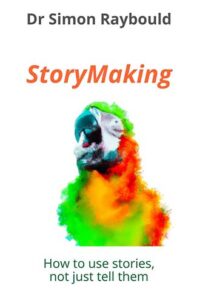
Simon: I’ve put a lot of time and energy into researching StoryMaking – at heart I’m still the research scientist I was for the first few decades after my PhD – so while little bits of it is obviously my opinion I tend to work in a much more empirical way than most presentation trainers. It’s important to me that we have tools that work for most people, most of the time, not “what worked for me”.
We’re living in a world where we’re absolutely bombarded with stories. Storytelling is the Next Big Thing! It’s touted as the solution to all problems in presentations, marketing and sales… but that’s just tosh – and it annoys me. What we should be talking about is the right stories, told in the right way. Stories are tools, just like a spade.
If you want to get a small hole you use a spade but for a big hole you use a mechanical digger. The right tool for the job.
Think of it this way – if you want to impress someone with your product or service you tell a short story about someone who’s used that service, not a funny story about when you got lost in New York. If you want to get people to warm to you, you’ll be better off telling a tactically chosen story about a weakness you’ve got or a mistake you made.
On the other hand, if you want to influence someone you tell a story of someone like them (but not too like them!).
I’m sure you get the idea. Different lengths, styles, points of view, heroes … they all impact upon what type of story you should use.
What’s pretty clear though, is that the big, heroic stories we all like to tell and which we’re bombarded with all the time tend to be less effective than we think. A story of against the odds heroic success, like a Batman film, is entertaining and your audiences will love it at the time but any motivational effect it has wears off in just minutes to hours for most people.
That’s what StoryMaking is about – getting past the mindlessly parroted mantra of “tell stories” to thinking about how we use stories as tools and resources. It’s a pretty forensic examination of how to find, store, recall and deploy the right story for maximum effect. It’s a book about using stories that’s got graphs in it! That should tell you what you need to know! 😀
Geetesh: Unlike many other resources, your book doesn’t offer a “magic formula” for creating and sharing stories. Does that make it more challenging for readers to incorporate stories into their presentations?
Simon: The problem with any magic formula is that if it works at all, it only works in the exact same circumstances as it was designed in. That’s no use to most people, because they’re not in identical circumstances. Unless you’re talking about computer hardware life is too messy and complicated for that.
What I do instead is explain to people the principles that sit behind things. It’s a little bit more hard work for people, because they’ve got to think, but the upside is that the things I’m giving them are much more likely to actually work – and to be useful in a whole range of circumstances.
If I explain how to find something called a “Hope So” story, you know how to find them for yourself and how to use them. If I’d just told you to “use this story” you’d be stuck in almost every situation except the one I was in when I told you what to do.
I know people are short of time and want a copy-paste answer, but we’ve all been in a situation where we’ve tried to follow a recipe that says something like “cook for 45 minutes” and it’s not quite worked – perhaps because our oven isn’t quite as hot as the other person’s. On the other hand if I’ve been taught how to tell if something’s ready to serve I can adjust cooking times for myself.
Frankly, it’s more interesting too, and a lot more fun to do things my way. 😊
For example, I’ve just spent some time coaching a client for a TEDx on internet safety for children. I could have just said “use this story”. Instead I spent time explain what sort of stories would be most impactful and why. That means that not only does she have a cracking TEDx, (just released on the TED website) but she now knows how to find stories for herself next time.
It took me a long time to teach my daughters to drive when it would have been quicker to give them lifts… but now they can drive I don’t have to take them anywhere!
Geetesh: How do you think the role of stories in business presentations is evolving? Would you say stories are a universal solution to all presenting challenges?
Simon: For a professional storyteller and storytelling trainer it might surprise people to find out I don’t think stories are a panacea. They don’t solve all presenting challenges. Other tools like PowerPoint don’t solve all challenges, so why would tools like stories?
We’ve all seen awful slides, just like we’ve all heard pointless stories.
Stories have a bit of an advantage there though – even if a story is pointless, I can at least make it interesting. A boring slides boring whatever you do to it. 😉
I’d like to think that the role of stories is evolving… moving on from being counter-productive “hero stories” to being more useful tactical stories that can be used to explain and illustrate. Stories become more of a pragmatic tool than the mythological nonsense they were sold to us as!
The views and opinions expressed in this blog post or content are those of the authors or the interviewees and do not necessarily reflect the official policy or position of any other agency, organization, employer, or company.
Filed Under:
Interviews
Tagged as: Books, Interviews, Presentation Skills, Simon Raybould, Stories
Comments Off on StoryMaking – How to Use Stories, Not Just Tell Them: Conversation with Simon Raybould
Microsoft and the Office logo are trademarks or registered trademarks of Microsoft Corporation in the United States and/or other countries.