
This is the print version of this page. All content is copyright Indezine.com 2000-2026.
Thoughts and impressions of happenings in the world of PowerPoint and presentations, continuously updated since 2003.
See Also:
PowerPoint and Presenting Notes
PowerPoint and Presenting Glossary
After adding a Bookmark to an audio clip, you may want to edit or remove the Bookmark altogether. In PowerPoint you can’t edit a Bookmark — for example, you cannot change the time of your Bookmark from 30 seconds to 28 seconds. To achieve this change, you have to delete the earlier Bookmark, and then add a new Bookmark on the time position that you want.
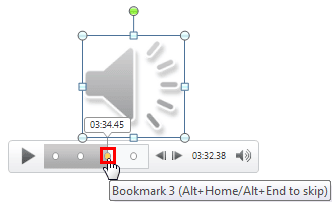
Learn to remove bookmarks from audio clips in PowerPoint 2010 for Windows.
Filed Under:
PowerPoint 2010
Tagged as: Music, PowerPoint 2010, Sounds, Tutorials
Comments Off on Remove Bookmarks from Audio Clips in PowerPoint 2010 for Windows
If you have drawn on a flip chart or even a blackboard — or just doodled on the back of a napkin, then you must have drawn a square (or just let us call it a “box”) with just a pencil or a marker? How about achieving that same hand-drawn look on your slides? Yes, you can use PowerPoint’s built-in shapes but you’ll end up with a square that’s so perfect! On the other hand, a hand drawn square will look distinct and different — it’s almost a powerful statement. Squares are just one of the 8 shape types we have included in this Organic Shapes collection – and each 8 of these shape types have 10 variants each – so you end up with 80 hand-drawn shape options!


Buy and download these slides now.
Filed Under:
Presentation Bank
Tagged as: Design, Graphics, PowerPoint, Presentation Samples
Comments Off on PowerPoint Concept Slides: Organic Squares
Have you tried to draw a circle with just holding a pencil or marker in your hand? You’ll end up with a circle that may fail you in a geometry test but it still looks human, personal, and different — just like these organic circle shapes. Circles are just one of the 8 shape types we have included in this Organic Shapes collection – and each 8 of these shape types have 10 variants each – so you end up with 80 hand-drawn shape options! These shapes will help break the monotony of text heavy slides, and assist you in explaining difficult concepts better to your audiences. Using these organic shapes also convinces your audiences that you care enough about them to make the slides look appealing and comprehensible. What’s more, these shapes are also so much fun to use!


Buy and download these slides now.
Filed Under:
Presentation Bank
Tagged as: Design, Graphics, PowerPoint, Presentation Samples
Comments Off on PowerPoint Concept Slides: Organic Circles
In this issue, we have an interview with Yossi Pinkas who discusses MagPointer, an amazing plug-in that lets you zoom and enhance your slides while presenting – do try playing with their free trial. You can also download our Six Petals circle that lets you create an info-graphic that’s different yet subtle. PowerPoint 2010 users can learn how to fade audio clips, and PowerPoint 2011 for Mac users can get started with indents for bulleted lists.

Read all this and more in Indezine News.
Filed Under:
Ezine
Tagged as: Ezine, Indezine, News, PowerPoint
Comments Off on Indezine News: February 26, 2013
These Six Petals Circle graphics are part of our Petal Circles series that add stylized tips to your circle shapes. These two tip styles: Rounded and Pointed make your circles look different from conventional segmented circle graphics. They also break the monotony of text heavy slides, and help you explain concepts better to your audiences. Using these circle shapes also convinces your audiences that you care enough about them to make the slides look appealing and comprehensible. What’s more, these shapes are also so much fun to use!

Buy and download these slides now.
Filed Under:
Presentation Bank
Tagged as: Design, Graphics, PowerPoint, Presentation Samples
Comments Off on PowerPoint Concept Slides: Six Petals Circle
Microsoft and the Office logo are trademarks or registered trademarks of Microsoft Corporation in the United States and/or other countries.