
This is the print version of this page. All content is copyright Indezine.com 2000-2026.
Thoughts and impressions of happenings in the world of PowerPoint and presentations, continuously updated since 2003.
See Also:
PowerPoint and Presenting Notes
PowerPoint and Presenting Glossary
“Words, words, words! I get words all day through,” are the exasperated lyrics exclaimed by the title character of My Fair Lady, the classic musical play and film. Her exasperation is with the speech professor who is drilling her in word skills as part of an effort to elevate her social status from a flower girl to an upper-class lady. Henry Higgins, the play’s fictional professor, is also exasperated—and so are countless real speech teachers and coaches, writers, and editors—with the decline of the English language.

Image: Pixabay
Filed Under:
Guest Posts
Tagged as: Communication, Guest Post, Jerry Weissman, Opinion, Words
Comments Off on Six Ways to Win with Words
When launched, PowerPoint 2016 for Mac typically opens the New Pane of Backstage view that contains the Presentation Gallery. The Presentation Gallery provides several ways to start your new presentation using a Template, a Theme, a recent presentation, a not-so-recent presentation, or even a blank presentation.
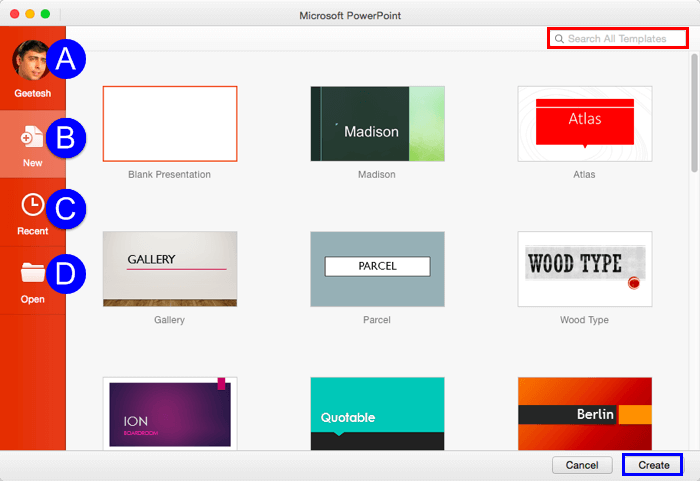
Explore the Presentation Gallery in PowerPoint 2016 for Mac.
Filed Under:
PowerPoint 2016
Tagged as: Interface, Mac, Office 2016, Office for Mac, PowerPoint 2016, PowerPoint for Mac, Presentation Gallery, Tutorials
Comments Off on Presentation Gallery in PowerPoint 2016 for Mac
You have already learned about picture bullets, and how you can import any picture and use it as a custom bullet. You can also create your own picture bullets to use in presentations, and these can be created right within PowerPoint!

Learn how to create your own picture bullets in PowerPoint 2016 for Windows.
Filed Under:
PowerPoint 2016
Tagged as: Bullets, Graphics, Microsoft Windows, Office 2016, PowerPoint 2016, Tutorials
Comments Off on Create Your Own Picture Bullets in PowerPoint 2016 for Windows
We have so many interactive and communicative visitors on Indezine.com. They get in touch via email, or the feedback forms, or via our chat applet, and even through our LinkedIn and Facebook communities. One question that has come up often is about topics for Pecha Kucha presentations. So I decided to do something about these questions by writing this post about easy topics for Pecha Kucha presentations.
See Also: 10 Tips for Pecha Kucha | Pecha Kucha Questions
Let’s start with wondering about why do readers ask for topic ideas? Why not choose something that’s close to their heart or something that inspires them? That’s because Pecha Kucha presentations are not your typical PowerPoint slide decks. In fact, there’s no rule in Pecha Kucha that dictates you must use PowerPoint. As long as you have twenty slides, it does not matter if you are using PowerPoint, Keynote, Prezi, Google Slides, a PDF, or even a program that advances photographs. Just remember that these presentations are limited to twenty slides that show up for only twenty seconds each. And the presenter must speak all along, while the slides are showing and changing.
The second reason people ask for topic ideas is that this might be their first Pecha Kucha presentation, and they are not sure what will work, and what won’t.
Yes, it is a good idea to use a simple topic, and it helps if the topic is something you are excited about. The Pecha Kucha site says, “The key to a great presentation is to present something you love.”
But what are simple topics, that excite you, and are interesting to your audiences? Of course, if you already have a topic, you need not read further, but if you are still looking for ideas, here are ten easy topics that you can use for your Pecha Kucha presentations.
Filed Under:
Thoughts
Tagged as: Ideas, Pecha Kucha, Presentation Skills, Presentations, Ten
Comments Off on Ten Easy Topics for Pecha Kucha
Whenever you insert a new shape into a PowerPoint slide, it is filled with a solid color by default (or the default fill may be different depending on the Theme applied to your presentation). Most of the time, you may leave that unaltered, but there may be times you want just the outline to be visible. This sort of outlining focuses the part of the picture that has to be highlighted. It is in scenarios like these where it can be useful to learn how to remove any fill.

Remove fill from shapes in PowerPoint 2016 for Mac.
Filed Under:
PowerPoint 2016
Tagged as: Fills, Mac, No Fill, Office 2016, Office for Mac, PowerPoint 2016, PowerPoint for Mac, Shapes, Tutorials
Comments Off on No Fill for Shapes in PowerPoint 2016 for Mac
Microsoft and the Office logo are trademarks or registered trademarks of Microsoft Corporation in the United States and/or other countries.