
This is the print version of this page. All content is copyright Indezine.com 2000-2026.
Thoughts and impressions of happenings in the world of PowerPoint and presentations, continuously updated since 2003.
See Also:
PowerPoint and Presenting Notes
PowerPoint and Presenting Glossary
 Henry Wong, the chief development officer of PearlMountain Limited, is a dedicated graphics and software development engineer with more than 7 years experience in senior software engineering skills. He enjoys the collaborative and communicative aspects of working in this position. Henry continuously researches and tries to find simple ways to develop easy-to-use graphical applications that can help others unleash their creativity.
In this conversation, Henry discusses DesignEvo, an online app that lets you create logos.
Filed Under:
Interviews
Tagged as: DesignEvo, Graphics, Henry Wong, Interviews, Logo
Comments Off on DesignEvo: Conversation with Henry Wong
PowerPoint for the Web’s tri-paned interface has three regions: the Slides Pane, the Slide Area, and the Notes Pane. The Notes Pane is placed right below the Slide Area, as shown highlighted in red within Figure 1. The Notes Pane provides space to add speaker’s notes that can be so helpful to the presenter while presenting. You can also write any sort of information about the presentation or individual slide.
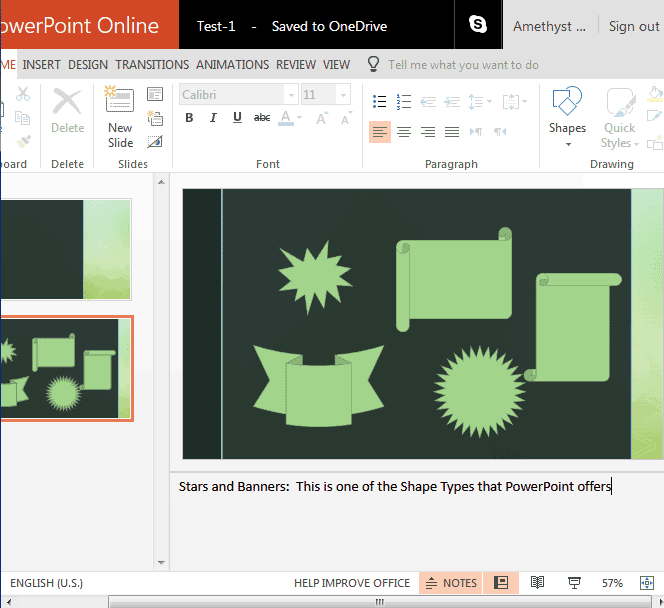
Learn about the Notes Pane in PowerPoint for the Web.
Filed Under:
PowerPoint for the Web
Tagged as: Notes Pane, PowerPoint for the Web, Tutorials
Comments Off on Notes Pane in PowerPoint for the Web
 As an expert with broad experience in data collection and presentation, Jude Barak understands to what extent companies need data as a backup support. Collection and analysis of data and preparation for proper display are critical processes to the success of young and well-established companies alike. Based in Israel, Jude speaks 4 languages, which provides her with a broad perception on the importance of multilingual awareness. Jude is the owner of ExcelLeader.
In this conversation, Jude discusses creating multilingual presentations.
Filed Under:
Interviews
Tagged as: Interviews, Jude Barak, Language, Multilingual, PowerPoint
In this issue, we feature the first post in our Possibilities series, which will explore both rare and frequent visited PowerPoint and presenting scenarios. In this first post, we look at the differences between static and dynamic presentations. We also feature Richard Goring from BrightCarbon, a presentations and eLearning agency. Richard discusses his upcoming webinar as part of the Outstanding Presentations Workshop 2017 series.
Continuing the series from last week, we explore creating PowerPoint outlines in Word 2008 for Mac and TextEdit. We then look at opening presentations from within PowerPoint Online on OneDrive. PowerPoint 2016 for Windows users can learn about the interface, while PowerPoint 2016 for Mac users can explore differences between text placeholders and text boxes, and learn about importing outlines. Finally, do not miss the quotes, press releases, and templates of this week.

Stay informed about updated tutorials and happenings related to PowerPoint and presenting.
Filed Under:
Ezine
Tagged as: Ezine, Indezine, News, PowerPoint
Comments Off on PowerPoint and Presenting News: October 10, 2017
 Deb Peretz coaches people who are passionate about delivering results to their clients through online programs. She shows them how to avoid being just another unfinished course on their customers’ “To Do” lists while creating raving fans whose businesses are transformed. She also follows the latest brain research on how we think and learn and translates it into easily applied strategies and tips.
In this conversation, Deb discusses her webinar as part of the Outstanding Presentations Workshop 2017 series.
Filed Under:
Events
Tagged as: Deb Peretz, Outstanding Presentations Workshop, PowerPoint
Comments Off on Outstanding Presentations Workshop 2017: Conversation with Deb Peretz
Microsoft and the Office logo are trademarks or registered trademarks of Microsoft Corporation in the United States and/or other countries.