
This is the print version of this page. All content is copyright Indezine.com 2000-2026.
Thoughts and impressions of happenings in the world of PowerPoint and presentations, continuously updated since 2003.
See Also:
PowerPoint and Presenting Notes
PowerPoint and Presenting Glossary
Flickr does happen to be among the best resources for Creative Commons pictures. Yet how do you know that the Creative Commons licensed picture that you have found on Flickr is indeed an original asset? Even outside of Flickr, there are so many copied pictures serenading as originals — including some you find on Google’s Image Search.

I do think that Flickr is a better source for original pictures — but that may not always be true. As my friend, David Marcovitz rightly pointed out that “there’s not much to stop someone from downloading any picture (legally or illegally) and posting it to Flickr and putting a Creative Commons License on it! Of course, most of the time, pictures on Flickr are posted by the people who take them, and I tell my students all the time to go to Flickr and search for Creative Commons pictures, but that is far from a guarantee of the picture’s true status.”
Completely agree with you, David! In fact, I am often asked whether Flickr is a more dependable source for original pictures compared to other sites — and my answer is in the affirmative because there are a few Flickr features that make this site a better resource for copyright free pictures. But before we reach conclusions, let us ask some questions, similar to the ones David asked in the preceding paragraph:
Unfortunately, the answer is yes for the first two questions. Fortunately, the answer is no for the last question!
I must add that it does not pay to be pessimistic about this whole topic. There are indeed millions of genuine Creative Commons pictures on Flickr — and with a little housekeeping, you can certainly filter out the counterfeit stuff from the real. It also pays to be proactive by doing some research.
This is what I do when I look for Creative Commons licensed pictures on Flickr:
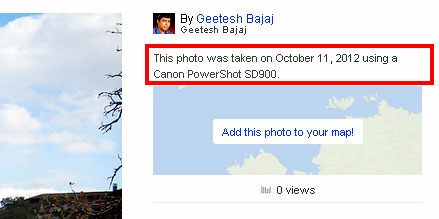

Even if you take all these issues into consideration, there may always be an occasion when you may be fooled — but at least you tried your best! Remember that being curious and intuitive can help — and that’s where a human can score higher than a computer!
See Also: Attributing Creative Commons Pictures in your PowerPoint Slides
Filed Under:
Uncategorized
Tagged as: Copyrights, Flickr, Pictures, PowerPoint
Comments Off on Is this Picture on Flickr an Original?
We get you an exclusive interview with Drew Banks of Prezi — he discusses the success and origins of Prezi — and what sets it apart from other slide programs. Brainshark’s Andy Zimmerman discusses their new Sales Enablement Portal — and Jerry Weissman talks about his new book, Winning Strategies for Power Presentations. We also get your more pushpin graphics for your slides this week. Finally, you will find simple-to-understand, cross referenced tutorials on PowerPoint tasks. If you use PowerPoint 2013 for Windows, look at our tutorials on Gridlines and Guides that help you position your slide objects in place. PowerPoint 2011 for Mac users will enjoy tutorials on Text Transforms and Inserting Movie clips.

Read all this and more in Indezine News.
Filed Under:
Ezine
Tagged as: Ezine, Indezine, News, PowerPoint
Comments Off on Indezine News: April 16, 2013
When you insert a video in your presentation, you might see that the placed video clip displays a blank or black rectangle on the slide. If your video clip does not show a black rectangle, then of course there is no issue concerned. However, if it does show this black rectangle, your viewers may not find this appealing at all. With PowerPoint 2011’s Poster Frame feature, you can easily overcome this limitation, and change the black rectangle to an image by selecting a frame from the video itself, or even a picture from a different source.

Learn how to add a Poster Frame for your video clips in PowerPoint 2011 for Mac.
Filed Under:
PowerPoint 2011
Tagged as: Movies, Office for Mac, PowerPoint 2011, Tutorials, Video
Comments Off on Learn PowerPoint 2011 for Mac: Poster Frames for Videos
You cannot locate PowerPoint 2013 on your computer? Or you are not sure if there are any other versions of PowerPoint on your computer — maybe an older version? Yes, we know that this can happen, although it does sound a little strange. You may be unable to locate PowerPoint, mainly in scenarios such as these.

Here’s how you can locate in PowerPoint 2013 for Windows.
Filed Under:
PowerPoint 2013
Tagged as: PowerPoint 2013, Tutorials
Comments Off on Locate Your Version in PowerPoint 2013 for Windows

After a career of 10 years as management consultant with McKinsey & Company in Amsterdam and London, Jan Schultink now is the Founder and CEO of Idea Transplant, a presentation design firm that creates sales, conference, and investor presentations. He is based in Tel Aviv but serves clients all over the globe.
In this conversation, Jan discusses his new e-book, Pitch It!
Geetesh: Tell us about what motivated you to write Pitch It! Also, how would a book like this have helped you 10 years ago?

Jan: As a professional presentation designer I have been writing short daily blog posts with suggestions how to design better presentations. The blog is not very structured: whatever comes to mind in the morning becomes that day’s post. As a result, it is not that easy to search the archive with 4 years’ worth of posts. The idea for the book was to take all that content and put it in a logical and consistent flow.
Personally, I went through this transition from a management consultant at McKinsey (still hand-scribbling exhibits that had to be produced by graphics designers) to a professional presentation designer. If I had a book like this in my hands 10 years ago, that transition would have taken place much faster!
Geetesh: What sets Pitch It! apart from other books that discuss presentation design skills?
Jan: Presentation design books usually start from the design/story writing angle: why bullet point slides are bad, how to structure a story, the basics of graphics design. I started from the end product: a sales or investor presentation, the most common type of high-stake presentations in business and worked my way backwards. The result is a highly practical book that assumes that you already are convinced that bullets points are bad, you just want very specific suggestions on how to design better presentations. When I design presentations for my clients, I pretty much follow the exact approach that is highlighted in the book.

The views and opinions expressed in this blog post or content are those of the authors or the interviewees and do not necessarily reflect the official policy or position of any other agency, organization, employer, or company.
Filed Under:
Interviews
Tagged as: Books, Interviews, Jan Schultink, Opinion, Presentation Skills
Comments Off on Pitch It!: Conversation with Jan Schultink
Microsoft and the Office logo are trademarks or registered trademarks of Microsoft Corporation in the United States and/or other countries.