
This is the print version of this page. All content is copyright Indezine.com 2000-2026.
Thoughts and impressions of happenings in the world of PowerPoint and presentations, continuously updated since 2003.
See Also:
PowerPoint and Presenting Notes
PowerPoint and Presenting Glossary
What happens to presenters who are nervous when it’s time for questions? Often the presenter is simply too nervous to listen to the query and just starts talking without providing a specific response. Or the presenter may not address the question at all, instead speaking about something else that is a “hot topic” and defending a particular position. Now the presenter is really in trouble: the questioner did not get an answer and a topic has been brought up that many people were hoping would not have to be discussed.

Image: StockUnlimited
Filed Under:
Guest Posts
Tagged as: Claudyne Wilder, Delivery, Guest Post, Opinion, PowerPoint
Comments Off on Answer the Question Asked
To make your text look consistent and clear, indentation is a must — especially if your text paragraphs comprise multiple bulleted levels. While the easiest way to play with indents is via the Indent Markers visible on the Ruler, this method does not let you precisely position the indentation since you just drag and pull the Indent Markers rather than setting them up via an exact numerical value. Fortunately, you can also set indentation using set numerical values — for this you need to access the Format Text dialog.
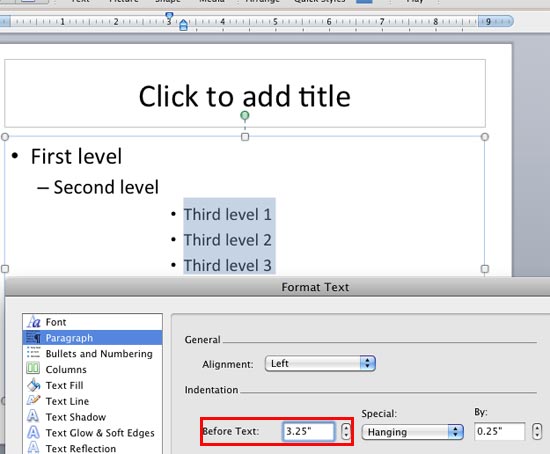
Learn how to set text indentation using the numerical values in PowerPoint 2011 for Mac.
Filed Under:
PowerPoint 2011
Tagged as: Office for Mac, PowerPoint 2011, Text, Tutorials
Comments Off on Learn PowerPoint 2011 for Mac: Set Text Indentation using Numerical Values
Once you insert an audio clip into your presentation, you may find that it is too long, or there may be parts in the clip that you don’t want the audiences to hear. Or maybe you just need a small bit to play — like the sound of that trumpet blowing! Although you can scrub the clip using the Player Controls bar to ascertain where you want the clip to begin and end, that option may become monotonous and inaccurate — and it also looks very unprofessional if you try scrubbing an audio clip right in front of your audience. Fortunately, PowerPoint’s trim audio options can make this easy for you — follow these steps to explore how you can trim an audio clip right inside PowerPoint 2010 for Windows.

Learn how to trim audio clips in PowerPoint 2010 for Windows.
Filed Under:
PowerPoint 2010
Tagged as: Music, PowerPoint 2010, Sounds, Tutorials
Comments Off on Learn PowerPoint 2010 for Windows: Trim Audio Clips
By Carmen Simon
I have recently completed a research study on what makes PowerPoint presentations memorable. 1,540 people participated in the study and after 48 hours, they remembered an average of 4 slides out of 20 slides they viewed.
This finding is perhaps expected: unless there is some repetition and enforcement, memory fades quickly. There were however a few observations that I found surprising and almost counter-intuitive to what we’ve been taught as communicators. So here are the surprises, along with some principles to consider before you design your next PowerPoint presentation.
Filed Under:
Guest Posts
Tagged as: Carmen Simon, Guest Post, Opinion, PowerPoint, Survey
In this issue, we bring you our awaited Organic Shapes series of concept slides — the shapes are all hand drawn in appearance and will make a pleasant change from the typical geometric shapes you see on most slides these days. Additionally, we do have several new tutorials — PowerPoint 2010 users will learn how they can remove and edit any bookmarks added to audio clips. PowerPoint 2011 for Mac users should read about how they can control the Hanging indent markers for any bulleted text. Finally, we have an exclusive interview with Reena Cruz who discusses Able2Extract 8’s PDF to PowerPoint conversion capabilities.

Read all this and more in Indezine News.
Filed Under:
Ezine
Tagged as: Ezine, Indezine, News, PowerPoint
Comments Off on Indezine News: March 5, 2013
Microsoft and the Office logo are trademarks or registered trademarks of Microsoft Corporation in the United States and/or other countries.